
How to Get Windows 10 Product Key (CDKeys Included)
Knowing how to get Windows 10 product key is still essential for many users today. Whether you plan to reinstall Windows, upgrade hardware, replace a failed hard drive, or troubleshoot activation issues, having the correct product key can save hours of frustration.
In real-world situations, many users discover that the traditional Command Prompt method does not always work. Sometimes, the key appears incomplete. In other cases, no key shows up at all. This often leads to confusion, especially when Windows claims it is already activated.
This guide explains how to get Windows 10 product key step by step. You will learn practical methods, understand why some approaches fail, and discover a reliable lost key recovery solution when standard tools fall short.
Table of Contents
What Is a Windows 10 Product Key?
A Windows 10 product key is a 25-character code used to activate Windows. It verifies that your copy of Windows is genuine and properly licensed.
There are several types of Windows 10 licenses:
- Retail license: Purchased directly from Microsoft or authorized sellers
- OEM license: Preinstalled on laptops or desktops
- Digital license: Linked to your Microsoft account instead of a visible key
Understanding these differences helps explain why some users struggle to find Windows 10 product key using common methods.
How to Get Windows 10 Product Key from Original Purchase Records
The simplest way to get Windows 10 product key is to check where you originally bought Windows.
Check the original packaging
If you purchased a physical copy of Windows 10, the product key is usually printed on a card inside the box. Many users store this packaging away and forget it exists.
Search your email inbox
For online purchases, Microsoft or authorized resellers send the key by email. Try searching your inbox using terms like:
- “Windows 10 product key”
- “Microsoft order”
- “Digital receipt”
Also check spam and archived folders. Emails containing Windows 10 CDKeys often get filtered automatically.
How to Get Windows 10 Product Key Using Command Prompt
When Windows is still running, Command Prompt can sometimes help you find Windows 10 product key.
Step-by-step instructions

2. Right-click and select Run as administrator
3. Enter the following command:
wmic path softwarelicensingservice get OA3xOriginalProductKey
4. Press Enter
If your system stores an embedded OEM key, it may appear on the screen.
When this method works best
- OEM systems with keys stored in BIOS
- Devices that shipped with Windows 10 preinstalled
However, many users discover that this method does not return any result. That situation is more common than most guides admit.
Why Command Prompt Often Fails to Find Windows 10 Product Key
Understanding this issue is critical if you want to reliably get Windows 10 product key.
Common reasons for failure
- Digital licenses do not store a visible key
- Windows upgrades reuse generic activation keys
- BIOS-stored OEM keys may not match the installed edition
- Reinstalled systems overwrite original license data
In these cases, Command Prompt either returns nothing or shows a generic key that cannot be reused.
This is where a dedicated solution becomes useful.
A More Reliable Way to Get Windows 10 Product Key
When standard methods fail, a professional product key finder offers a practical alternative.
Using Magic Recovery Key to Find Windows 10 Product Key
Magic Recovery Key is designed to scan system registry data and extract product keys that Windows itself does not clearly display.
Instead of relying on a single command, the software performs a deeper analysis of stored license information.
How it solves common problems
Magic Recovery Key helps when:
- CMD shows no key
- Windows displays a generic activation code
- You need to reinstall Windows on the same device
- You want to back up license information before formatting
How to use Magic Recovery Key
1. Download and install Magic Recovery Key.
Supports Windows 7/8/10/11 and Windows Server
2. Launch the program.
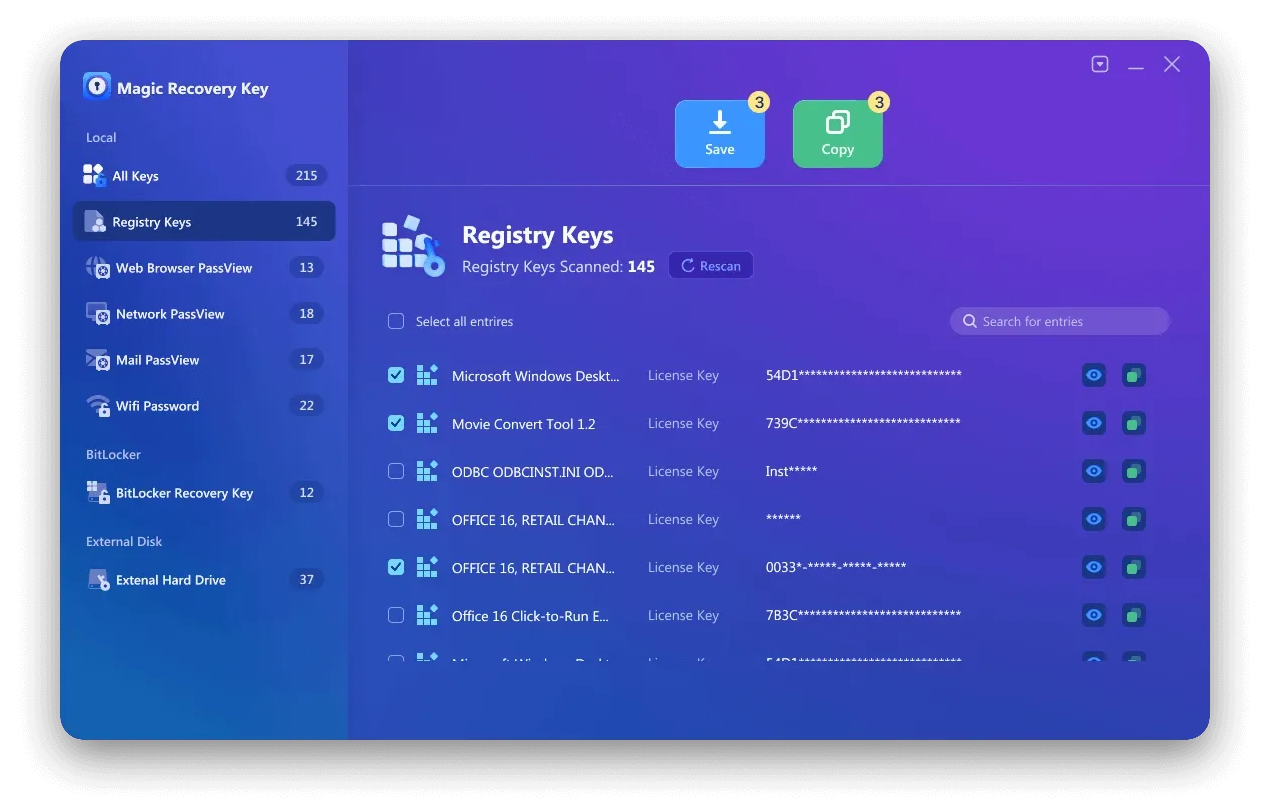
3. Open the Registry Keys section under “Local”.

4. Locate the Windows product key in the results panel.
5. Copy or save the key for later use.
Why Magic Recovery Key Is More Reliable Than Other Methods
From a practical standpoint, Magic Recovery Key offers several advantages when trying to get Windows 10 product key.
Core advantages
- Scans multiple registry locations
- Works even when CMD fails
- Supports Windows 7, 8, 10, 11, and Windows Server
- Retrieves keys for other installed software as well
Real-world usage scenarios
Many users rely on Magic Recovery Key before:
- Reinstalling Windows after a system crash
- Replacing a motherboard or hard drive
- Migrating software to a new PC
Compared with manual methods, it reduces uncertainty and minimizes activation errors.
If you are looking for a more efficient solution, Magic Recovery Key provides a dependable option without unnecessary complexity.
Contact Microsoft Support as a Last Resort
If you cannot find Windows 10 product key using any method, Microsoft Support may still help.
Before contacting them, prepare:
- Proof of purchase
- Microsoft account details
- Device information
While support can verify digital licenses, response times vary, and success depends on available records.
Conclusion
Knowing how to get Windows 10 product key prevents activation issues and saves time during system recovery. Although Command Prompt and purchase records work in some cases, they are not reliable for every system.
When those options fail, Magic Recovery Key offers a practical and trustworthy solution. It addresses common limitations of built-in tools and helps users recover essential license data with minimal effort.
For users preparing a reinstall or facing missing activation information, choosing the right tool can make the process far less stressful.
Supports Windows 7/8/10/11 and Windows Server
FAQs
Can I get Windows 10 product key from registry manually?
Why does CMD show a generic Windows key?
Is it safe to use a product key finder?
Does Windows 10 always have a visible product key?
Can Magic Recovery Key find keys on upgraded systems?
Will the same Windows 10 product key work again?
Can I use Windows 10 key for Windows 11?
When should I back up my Windows product key?

Erin Smith is recognized as one of the most professional writers at Amagicsoft. She has continually honed her writing skills over the past 10 years and helped millions of readers solve their tech problems.