
Windows Product Key Viewer: Retrieve Lost License Keys (2026 Guide)

Losing a Windows activation key is more common than many users expect. In fact, many users only realize the problem during system reinstallation. During system reinstallation, hardware upgrades, or SSD replacement, the Windows product key Viewer often becomes inaccessible.
Without a valid license key, Windows cannot be fully activated. This may result in limited features, constant activation reminders, or even installation failure.
However, traditional methods such as Command Prompt or Registry edits are still widely discussed online. However, these key recovery pproaches often fail on modern systems, especially OEM-based Windows devices.
As a result, a reliable Windows Product Key Viewer has become essential for everyday users who want a safe and efficient solution.
Table of Contents
What Is a Windows Product Key Viewer?
In simple terms, a Windows Product Key Viewer is a tool designed to locate and display the activation keys stored inside your Windows system. These keys may be stored in:
- The system registry
- BIOS / UEFI firmware (OEM keys)
- Encrypted system files
In contrast, a professional Windows activation key viewer can scan all relevant locations automatically. and present the correct license key in a readable format.
Common Methods to Retrieve a Windows Product Key (And Their Limits)
Before choosing a tool, it’s important to understand why many common methods fail.
Using Command Prompt (CMD)
At first glance, CMD commands are often recommended for advanced users.
Example command:
wmic path softwarelicensingservice get OA3xOriginalProductKey
Pros
- No extra software required
Cons
- Cannot detect many OEM or embedded keys
- Often returns empty results on Windows 10/11
- Not user-friendly for beginners
In real-world use, this method works only in limited scenarios.
Editing the Windows Registry
Another approach involves manually navigating registry paths such as:
HKEY_LOCAL_MACHINE\SOFTWARE\Microsoft\Windows NT\CurrentVersion
Risks
- High chance of system errors
- Accidental changes may cause Windows deactivation
- Registry corruption can prevent system boot
For non-technical users, this method is not recommended.
Unverified Third-Party Tools
Many online tools claim to be a Windows CD key viewer, but not all are trustworthy.
Common issues include:
- Inaccurate key detection
- Outdated algorithms
- Potential security risks
Choosing the wrong tool may create more problems than it solves.
The Professional Solution: A Reliable Windows Product Key Viewer
Because of these limitations, modern systems require a smarter approach. This is where a professional Windows license key viewer becomes valuable.
A reliable solution should:
- Detect OEM and UEFI-embedded keys
- Support Windows 7 through Windows 11
- Work offline to protect privacy
- Display results clearly and accurately
Why Magic Recovery Key Is a Recommended Windows Product Key Viewer
Magic Recovery Key by Amagicsoft solves the exact problems users face when trying to recover lost Windows activation keys.
Core Problems It Solves
- Lost Windows license after system reinstall
- OEM keys not readable by CMD
- Need for fast, safe key recovery
Key Advantages (Unique Selling Points)
- Automatically detects UEFI-embedded OEM keys
- Supports Windows 7, 8, 10, 11, and Windows Server
- Works offline with zero data exposure
- Simple interface suitable for non-technical users
Real-World Use Case
If your computer came with preinstalled Windows and the activation key is hidden in firmware, Magic Recovery Key can retrieve it instantly—without commands or risky edits.
Compared with manual methods or generic tools, this solution is more reliable because it reads keys directly from secure system locations.
If you are looking for an efficient and safe solution, Magic Recovery Key is worth trying.
How to Use Magic Recovery Key to View Your Windows Product Key
Follow these simple steps:
1. Download Magic Recovery Key from the official Amagicsoft website.
Supports Windows 7/8/10/11 and Windows Server
2. Install and launch the program.
3. Open Local > Registry Keys.

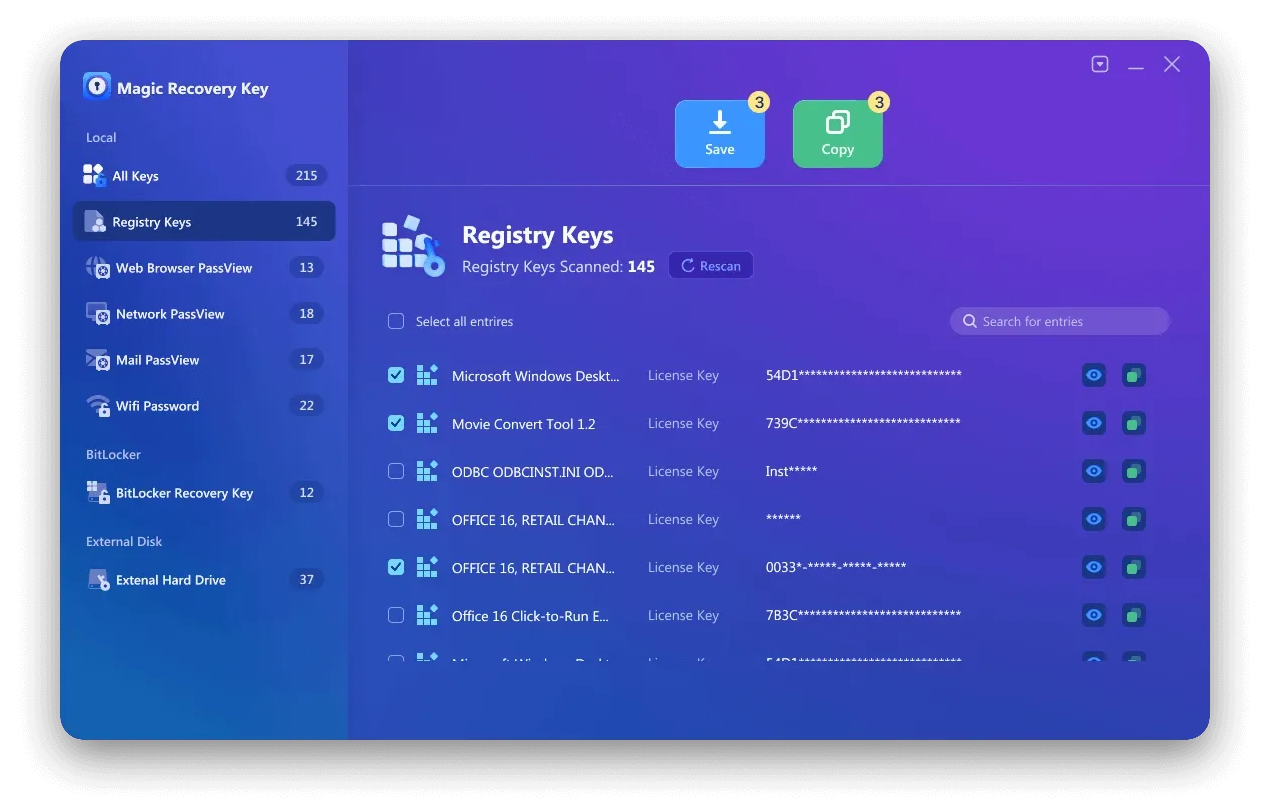
5. Copy or save the key securely.
The entire process takes only a few clicks and does not require technical knowledge.
Other Methods to View a Windows CD Key (If You Prefer Manual Options)
Although professional tools are recommended, alternative methods still exist.
Method 1: Command Line (Advanced Users)
✔ No software required
❌ Cannot detect most OEM keys
Method 2: Registry Editor
⚠ High risk of system instability
⚠ Not suitable for beginners
These methods may work in limited cases but are less dependable than a dedicated Windows Product Key Viewer.
Conclusion
Recovering a lost Windows license key does not need to be complicated or risky. A professional Windows Product Key Viewer offers a safer and more reliable lost key recovery approach.
Magic Recovery Key stands out because it:
- Handles modern OEM systems correctly
- Protects user privacy
- Simplifies a traditionally complex process
For users who want a dependable solution without technical stress, this tool provides a practical answer.
Supports Windows 7/8/10/11 and Windows Server
FAQs
How can I view my Windows product key?
Why doesn’t Command Prompt show my Windows product key?
What is the best Windows product key viewer?
Is it safe to use a Windows activation key viewer?
Can I recover my Windows product key after reinstalling Windows?
Does Magic Recovery Key support Windows 11?
Can this tool retrieve product keys for other software?
Do I need technical skills to use a Windows product key viewer?

Erin Smith is recognized as one of the most professional writers at Amagicsoft. She has continually honed her writing skills over the past 10 years and helped millions of readers solve their tech problems.